Crimson Desert Quick Guide
This is a quick guide for Crimson Desert, where I’m tracking things that caught my eye during my playthrough. These aren't tied to any specific map, they’re more about general observations on how the game works. I’ll keep adding new entries as I get further in, Crimson Desert Maps.
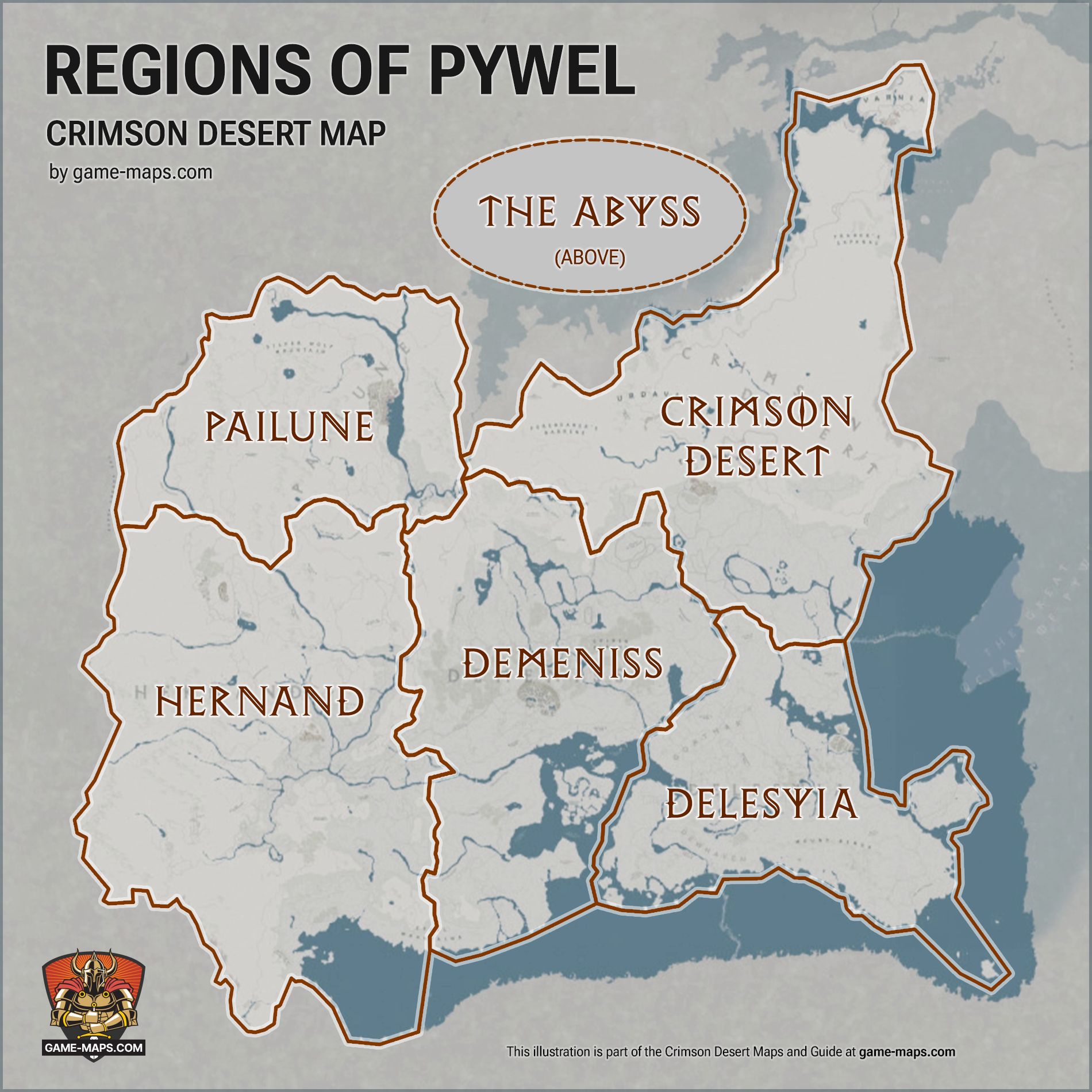
Regions of PywelCrimson Desert features five main regions across the world of Pywel, alongside a separate dimension called The Abyss. Each region features its own climate, mechanics, and distinct playstyle. HernandHernand is the starting region where you begin your journey. It’s home to medieval cities and the epicenter of political power struggles. The standout location is Hernand Town. Gameplay focuses on fighting humans, like mercenaries and deserters, along with wild animals. This is where you'll learn basics for sieges and managing your mercenary company. You’ll get familiar with the core mechanics and pick up your first skills here. The landscape features lush forests, fertile plains, and small mountains under a temperate climate. PailunePailune is a brutal, snowy mountain region and the Greymane homeland. Between the permafrost, massive peaks, and ice caves, you’re constantly fighting the cold. You’ll need to manage your gear and find heat sources, like campfires, to avoid freezing. The verticality here also means you’ll be doing a lot of climbing. Enemies include giant polar bears, ice trolls, and Greymane clan warriors. DemenissDemeniss serves as the political heart of Pywel, a region filled with ancient temples, military staging grounds, and strange magic. Demeniss capital itself is a massive city-state where high priests and top military brass call the shots. Gameplay leans into environmental puzzles tied to ancient magic and massive scale clashes against entire armies. DelesyiaDelesyia is a high-tech southeastern region crawling with mechanical enemies, laboratories, and high-end architecture. The landscape is dotted with factories, smokestacks, and labs that show off the reach of advanced engineering. Gameplay focuses on fighting automatons. Since enemies here use energy shields and ranged attacks, you’ll have to adopt a more defensive, tactical playstyle. The Crimson DesertThe Crimson Desert is a massive desert where the environment is as dangerous as the enemies. The landscape features red sands, huge dunes, and colossal skeletons stretching from the earth. Gameplay focuses on Heat and Thirst mechanics. You’ll have to manage water supplies and avoid traveling in direct sunlight. Expect to face giant sand worms, scorpions, and nomadic bandit tribes. The AbyssThe Abyss isn’t a region of Pywel in the traditional sense. It’s a separate dimension only accessible through portals. Physically, it sits above Pywel, suspended high above the clouds. The atmosphere is surreal, featuring floating islands, purple skies, and zero-gravity pockets. Gameplay focuses on logic puzzles and challenges. You’ll go up against Ancient Guardian bosses guarding high level artifacts. | |
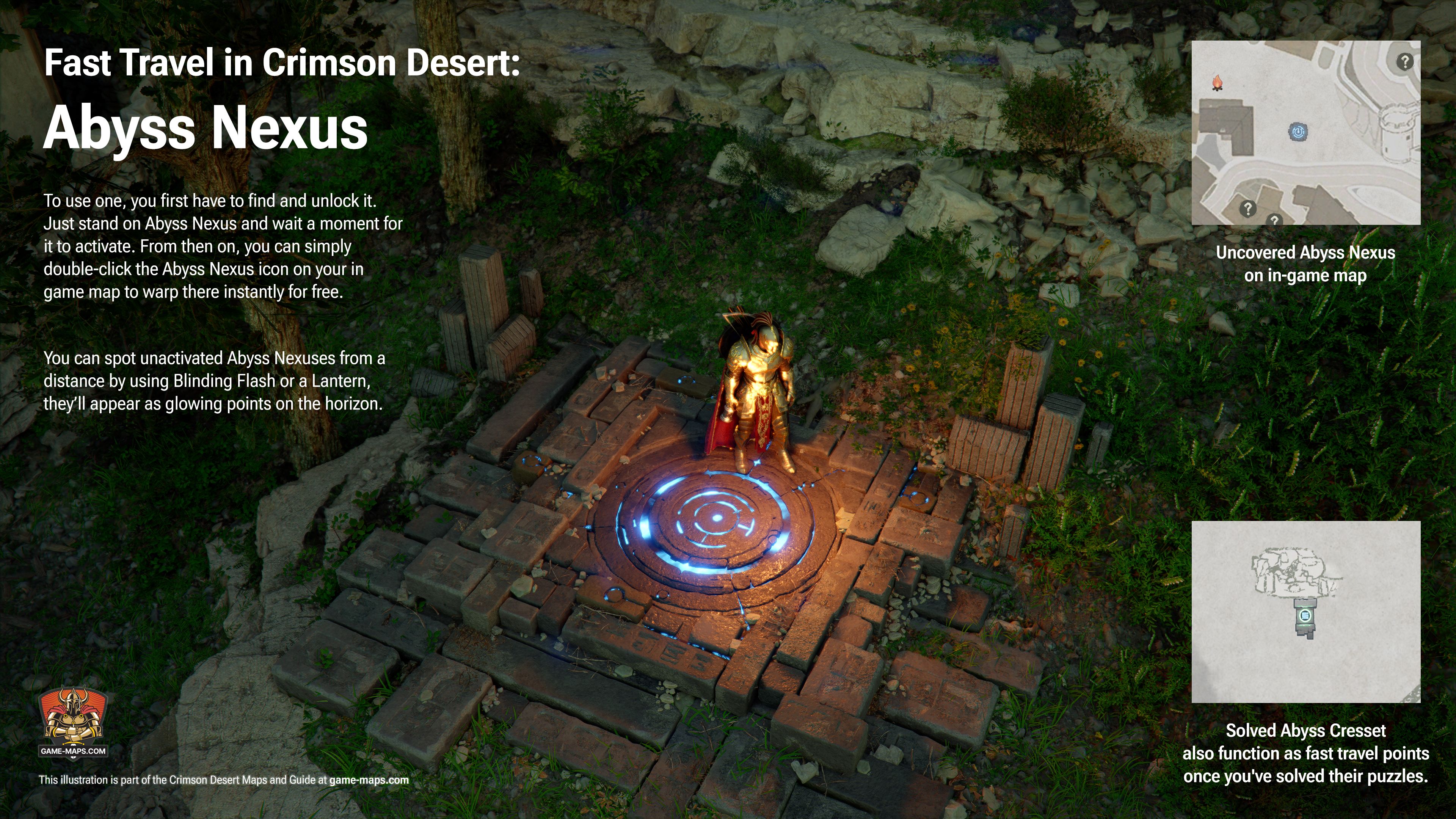
Fast Travel in Crimson Desert: Abyss NexusIn Crimson Desert, you can fast travel using teleports known as Abyss Nexuses. To use one, you first have to find and unlock it. Just stand on Abyss Nexus and wait a moment for it to activate. From then on, you can simply double-click the Abyss Nexus icon on your in game map to warp there instantly for free. Some Nexuses might be tucked behind simple environmental puzzles, so you’ll need to clear away any debris blocking them first. You can spot unactivated Abyss Nexuses from a distance by using Blinding Flash or a Lantern, they’ll appear as glowing points on the horizon. There are plenty of Abyss Nexuses scattered across key locations, so unlock them as soon as possible to make getting around much easier. A more advanced fast travel method involves Abyss Cressets, which also turn into teleports once you’ve solved their specific puzzles. | |
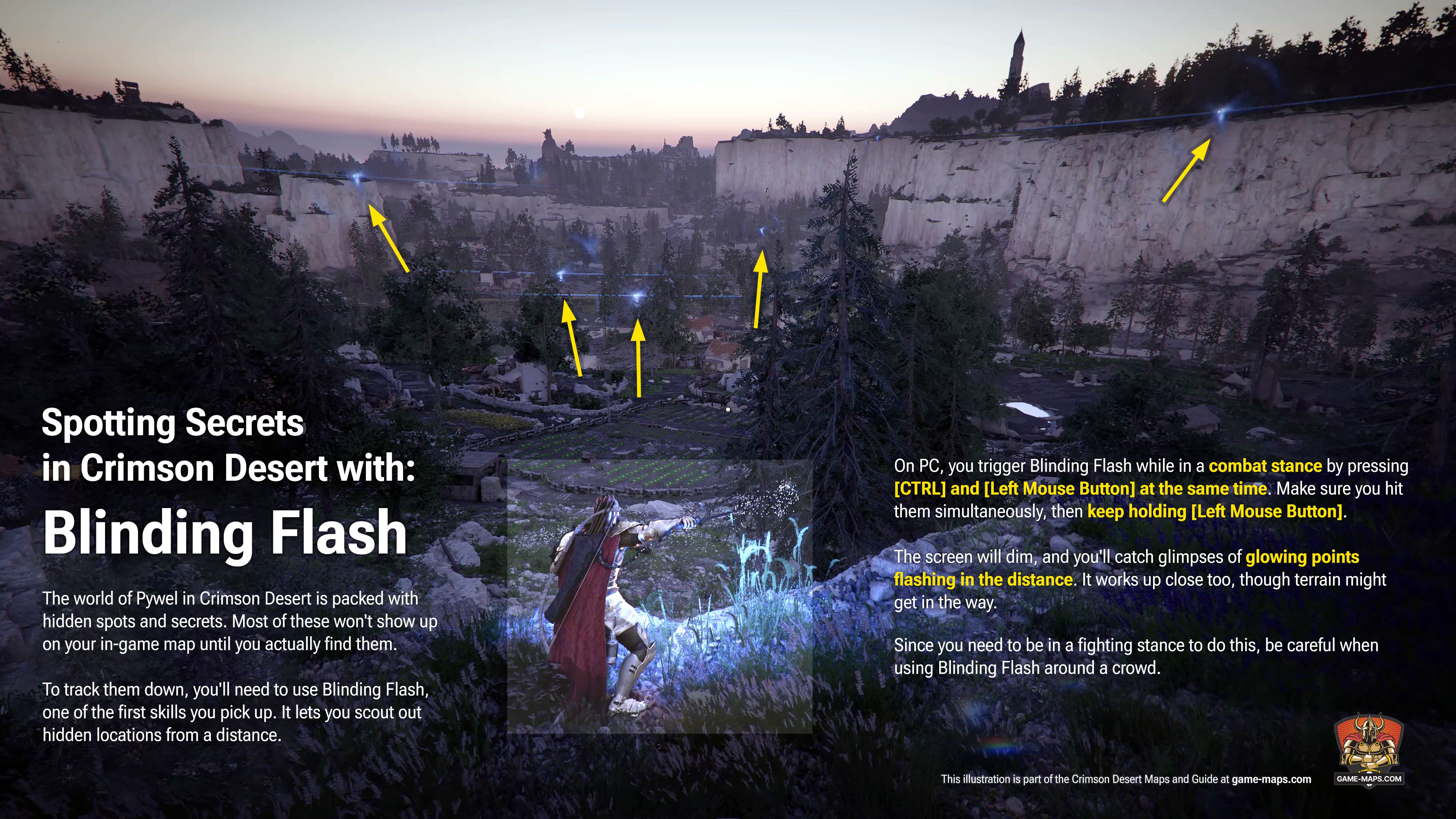
Spotting Secrets with Blinding FlashThe world of Pywel in Crimson Desert is packed with hidden spots and secrets. Most of these won't show up on your in-game map until you actually find them. To track them down, you'll need to use Blinding Flash, one of the first skills you pick up. It lets you scout out hidden locations from a distance. On PC, you trigger Blinding Flash while in a combat stance by pressing [CTRL] and [Left Mouse Button] at the same time. Make sure you hit them simultaneously, then keep holding [Left Mouse Button]. The screen will dim, and you'll catch glimpses of glowing points flashing in the distance. It works up close too, though terrain might get in the way. Since you need to be in a fighting stance to do this, be careful when using Blinding Flash around a crowd. Just keep in mind that locations spotted through Blinding Flash won't automatically appear on your map. You still have to physically reach them to mark them as discovered. | |
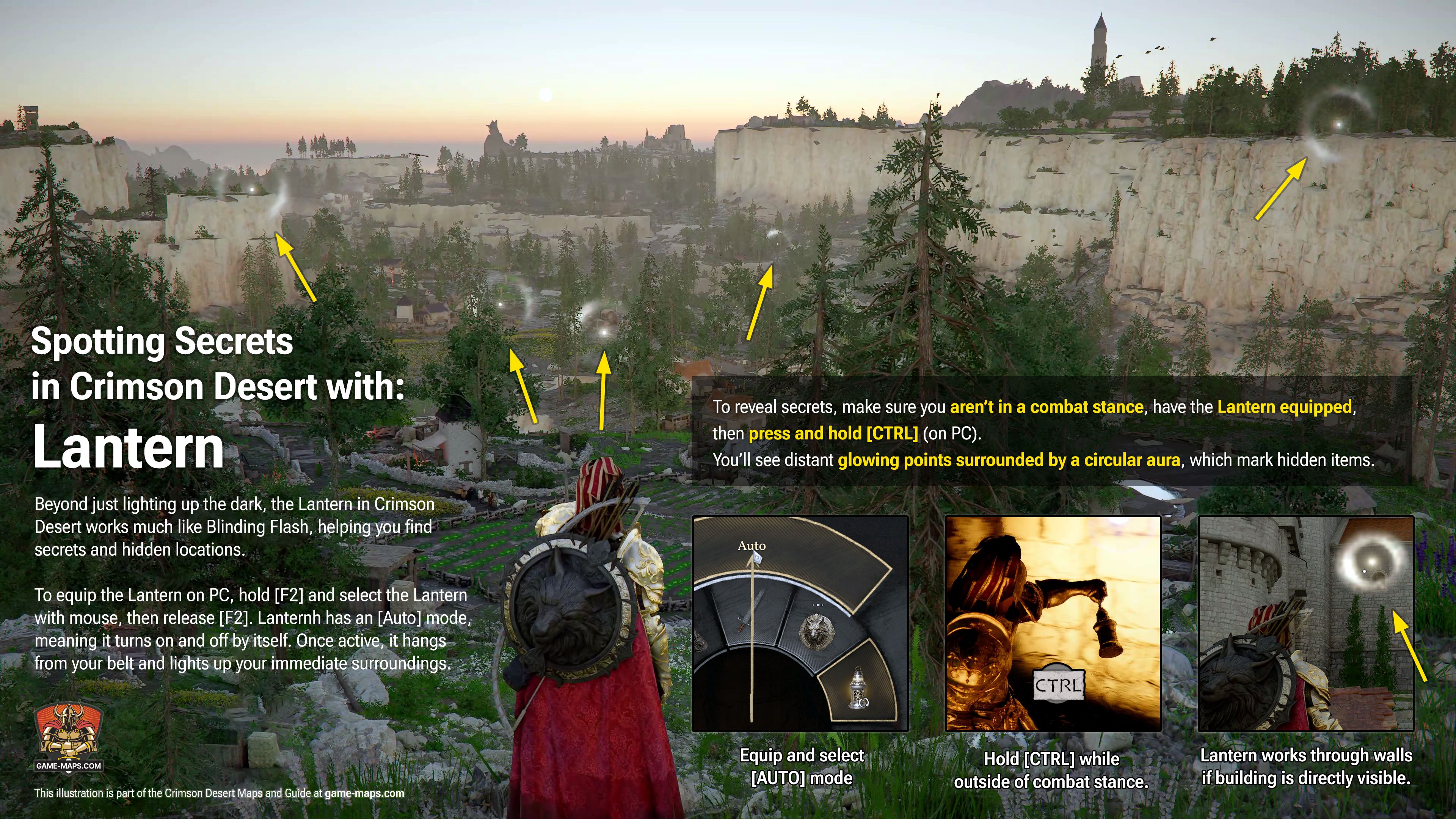
Spotting Secrets with LanternBeyond just lighting up the dark, the Lantern in Crimson Desert works much like Blinding Flash, helping you find secrets and hidden locations. To equip the Lantern on PC, hold [F2] and select the Lantern with mouse, then release [F2]. Lanternh has an [Auto] mode, meaning it turns on and off by itself. Once active, it hangs from your belt and lights up your immediate surroundings. To reveal secrets, make sure you aren’t in a combat stance, have the Lantern equipped, and press and hold [CTRL] (on PC). You’ll see distant glowing points surrounded by a circular aura, which mark hidden items. The Lantern even works through walls if you’re looking at a building containing a secret. It’s also effective at short range, highlighting objects when you stand directly in front of them. | |
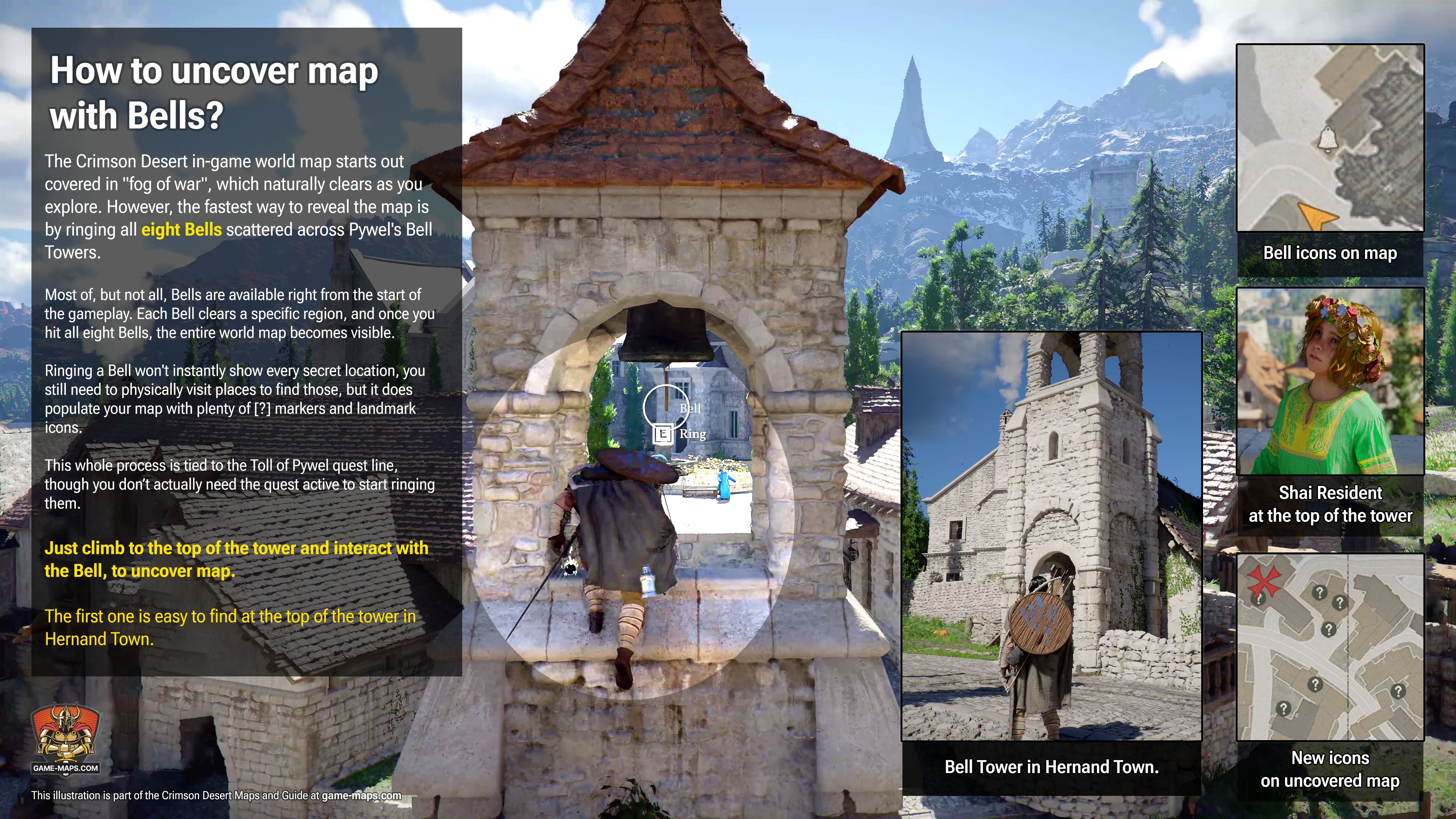
How to uncover map with Bells?The Crimson Desert in-game world map starts out covered in "fog of war", which naturally clears as you explore. However, the fastest way to reveal the map is by ringing all eight Bells scattered across Pywel's Bell Towers. Most of, but not all, Bells are available right from the start of the gameplay. Each Bell clears a specific region, and once you hit all eight Bells, the entire world map becomes visible. Ringing a Bell won't instantly show every secret location, you still need to physically visit places to find those, but it does populate your map with plenty of [?] markers and landmark icons. This whole process is tied to the Toll of Pywel quest line, though you don’t actually need the quest active to start ringing them. Just climb to the top of the tower and interact with the Bell. The first one is easy to find at the top of the tower in Hernand Town. | |
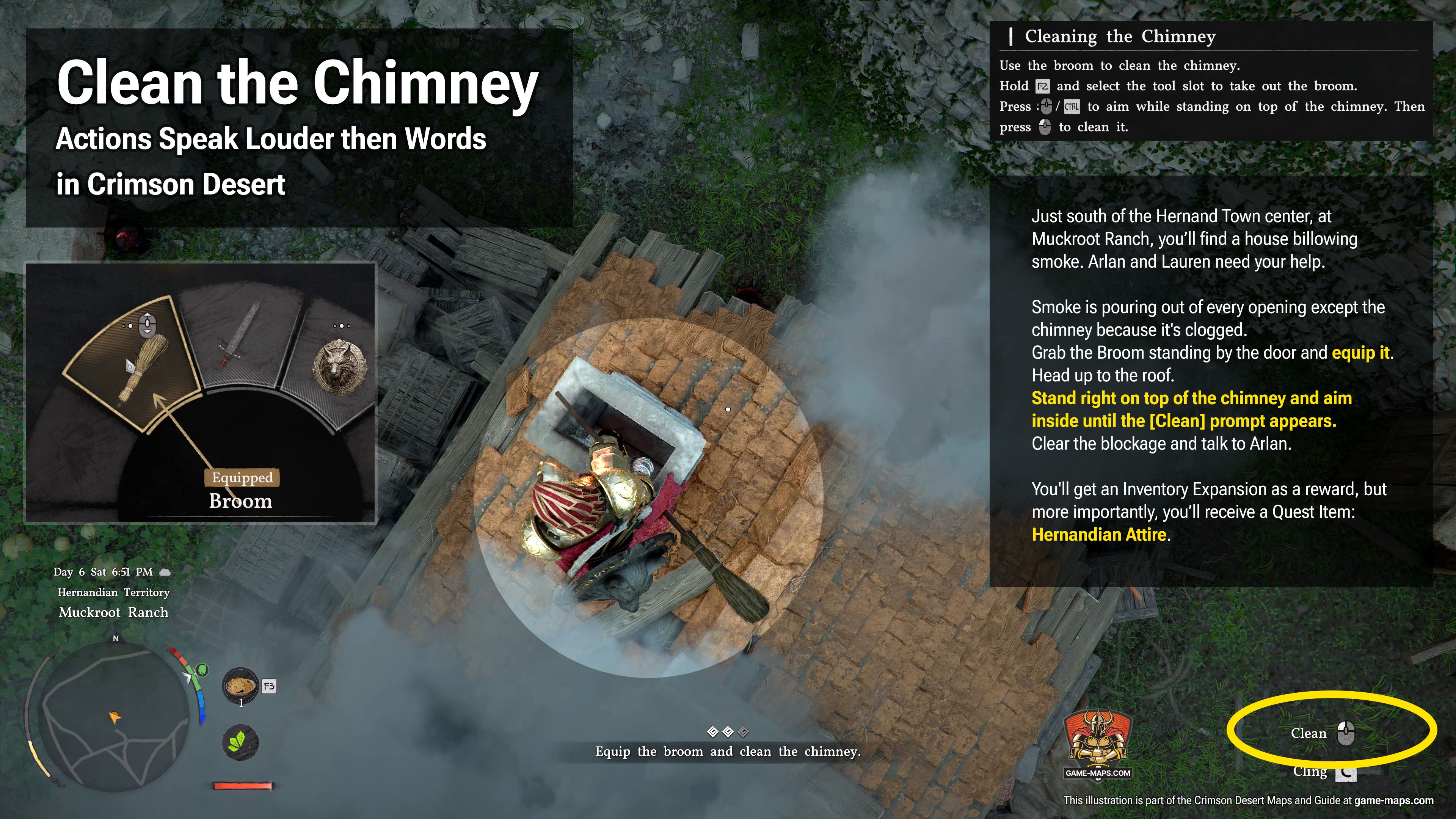
How to Clean the Chimney?Just south of the Hernand Town center, at Muckroot Ranch, you’ll find a house billowing smoke. Arlan and Lauren need your help. This is part of Main Quest: "Actions Speak Louder then Words" in Chapter 1: The First Encounter / Trials of Kindness. Smoke is pouring out of every opening except the chimney because it's clogged. Grab the Broom standing by the door and equip it. Head up to the roof. Stand right on top of the chimney and aim inside until the [Clean] prompt appears. Clear the blockage and talk to Arlan. You'll get an Inventory Expansion as a reward, but more importantly, you’ll receive a Quest Item: Hernandian Attire. You will need this cloth to enter Hernand Castle. |
What the Abyss is in Crimson Desert and how it all works.
The Abyss is a surreal, parallel dimension hanging high above Pywel. It's a collection of floating islands separated by a void, where the connections between them have been severed. One of your main goals is to bring things back online through Abyss Restoration.
The area is split into several main sectors. You reach them from the surface using massive structures called Spires, which act as Abyss Gates. There are also smaller fragments accessible via Abyss Cressets.
The Lore suggests the Abyss is actually a future version of Pywel, meaning these "ancient ruins" are actually remnants of the continent's own high-tech future leaking backward into the past. It’s less about a different location and more about a different time. While Pywel is built on physical strength, fire, and wood, the Abyss runs on Axiom Force, electricity, and plasma. The story here revolves around a conflict between a mysterious Alchemist and a rival named Caliburn.
You first step into the Abyss during the prologue in the Realm of Uncertainty, but that’s a small, contained area. Your real journey starts in Chapter 1 when you hit the Axiom Archive.
Here is how it works:
- You use Abyss Gates to jump to the Abyss Isles, starting with the one at Hernand Castle. These gates are one-way teleporters.
- Once you land, find the nearest Abyss Nexus and hit it to enable fast travel so you can return easily.
- Every island you visit is basically a wreck. To fix and complete an island, you have to beat an Abyss Restoration Challenge, which always involves some kind of Puzzle.
- Once the island is restored, its functions return and connections to other islands open up.
- Skybridge Gates and Alignment Devices will appear, allowing you to realign floating debris to rebuild your path.
- After finishing an island, an Abyss Teleporter usually pops up to send you to the next one
- And the cycle repeats: grab the Nexus, beat the Restoration Challenge, and use the Skybridge Gate to move on.
The puzzles get tougher as you go, and you'll need to master Axiom Force and Force Palm to solve them.
Exploring the Abyss is the most important thing you can do for character progression in Crimson Desert. While Pywel gives you gold and gear, the Abyss gives you power. The main payoff for completing Abyss Isles is grabbing Abyss Artifacts, which give you Skill Points. You’ll also pick up Faded Artifacts, Gems for weapon socketing, along with Axiom Force upgrades, ancient lore, and access to hidden bosses.
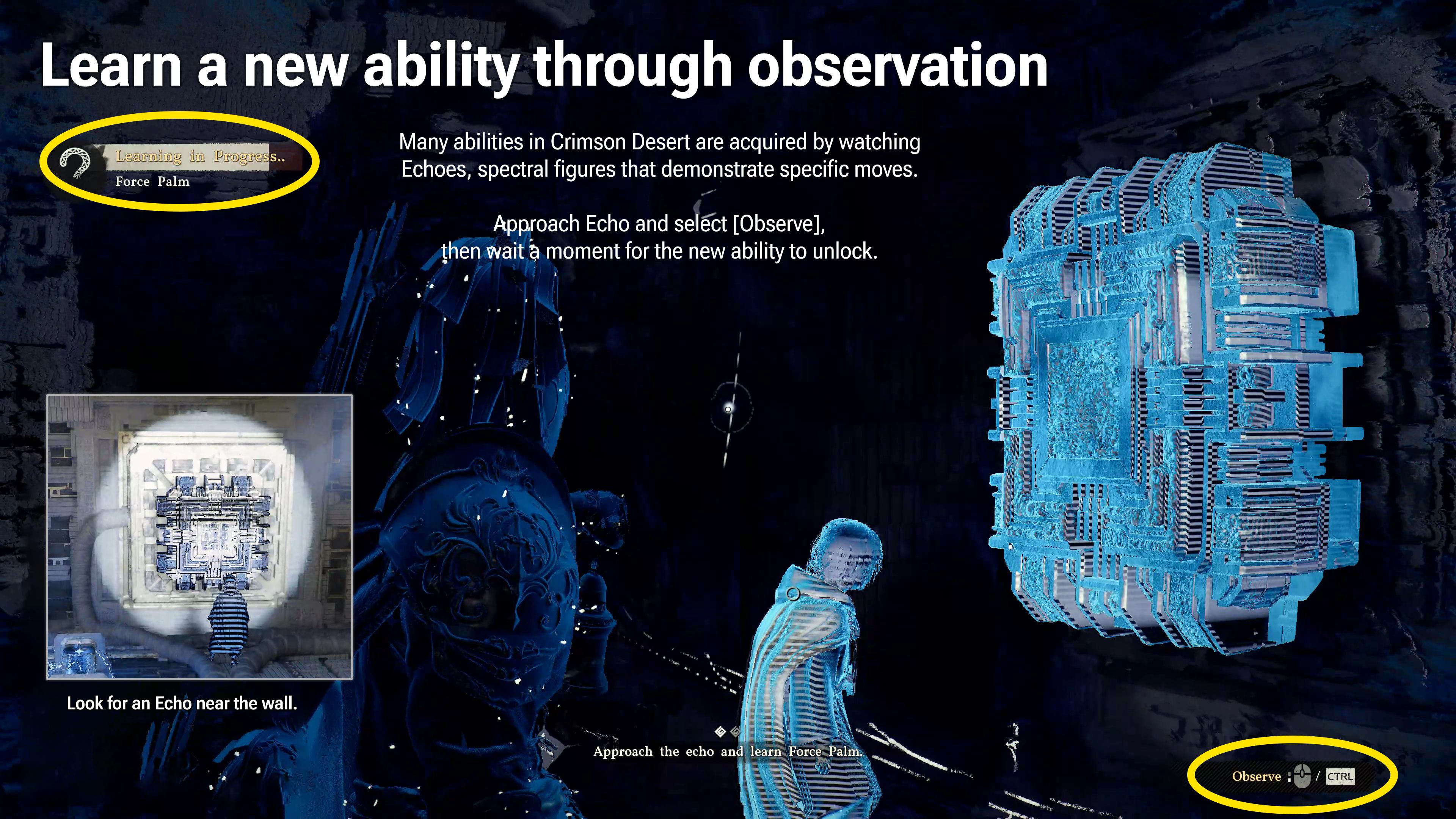
Learn a new ability through observationMany abilities in Crimson Desert are acquired by watching Echoes, spectral figures that demonstrate specific moves. Look for an Echo near the wall. Approach it and select [Observe], then wait a moment for the new ability to unlock. | |
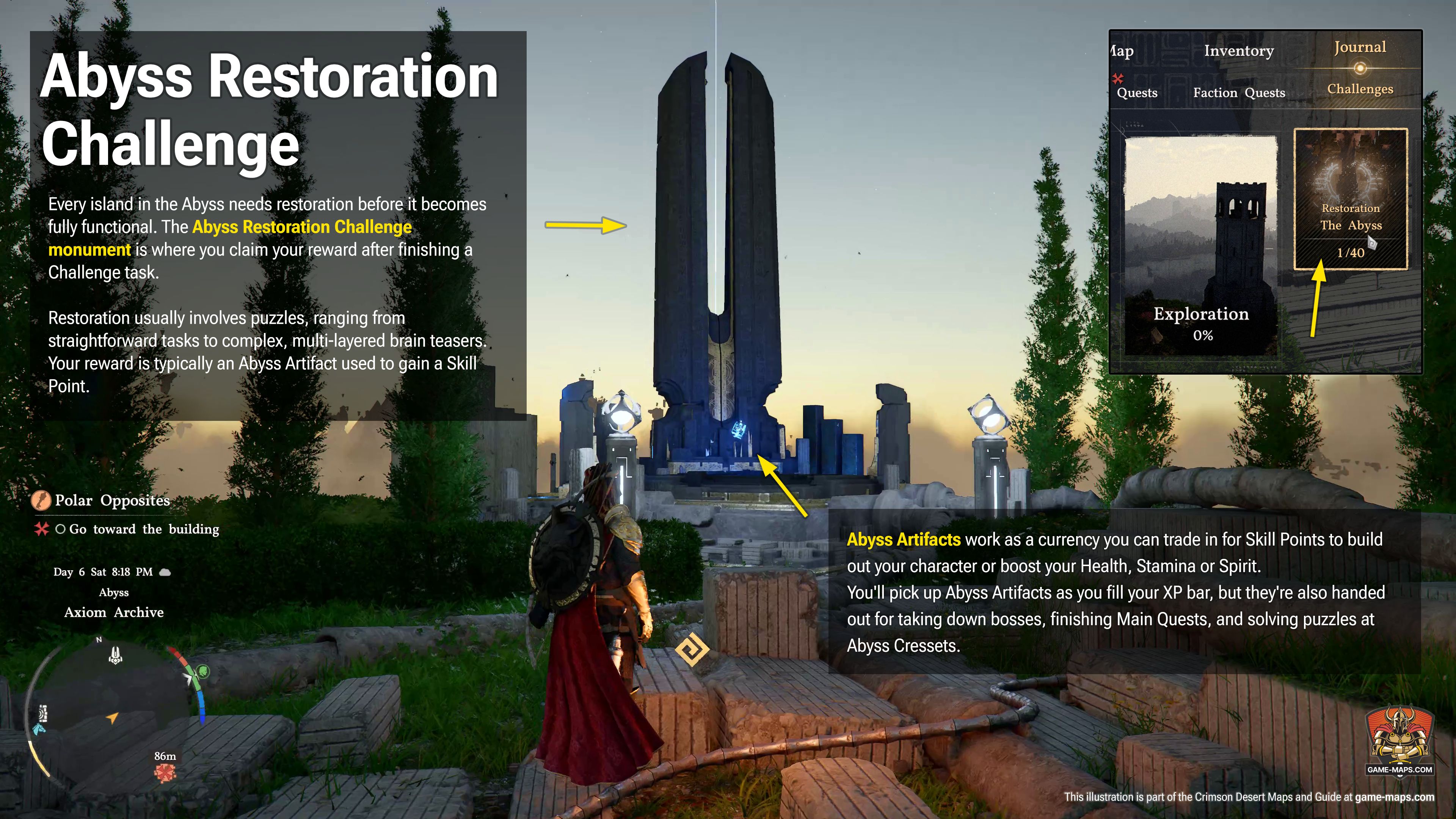
Abyss Restoration ChallengeEvery island in the Abyss needs restoration before it becomes fully functional. The Abyss Restoration Challenge monument is where you claim your reward after finishing a Challenge task. Restoration usually involves puzzles, ranging from straightforward tasks to complex, multi-layered brain teasers. Your reward is typically an Abyss Artifact used to gain a Skill Point. | |
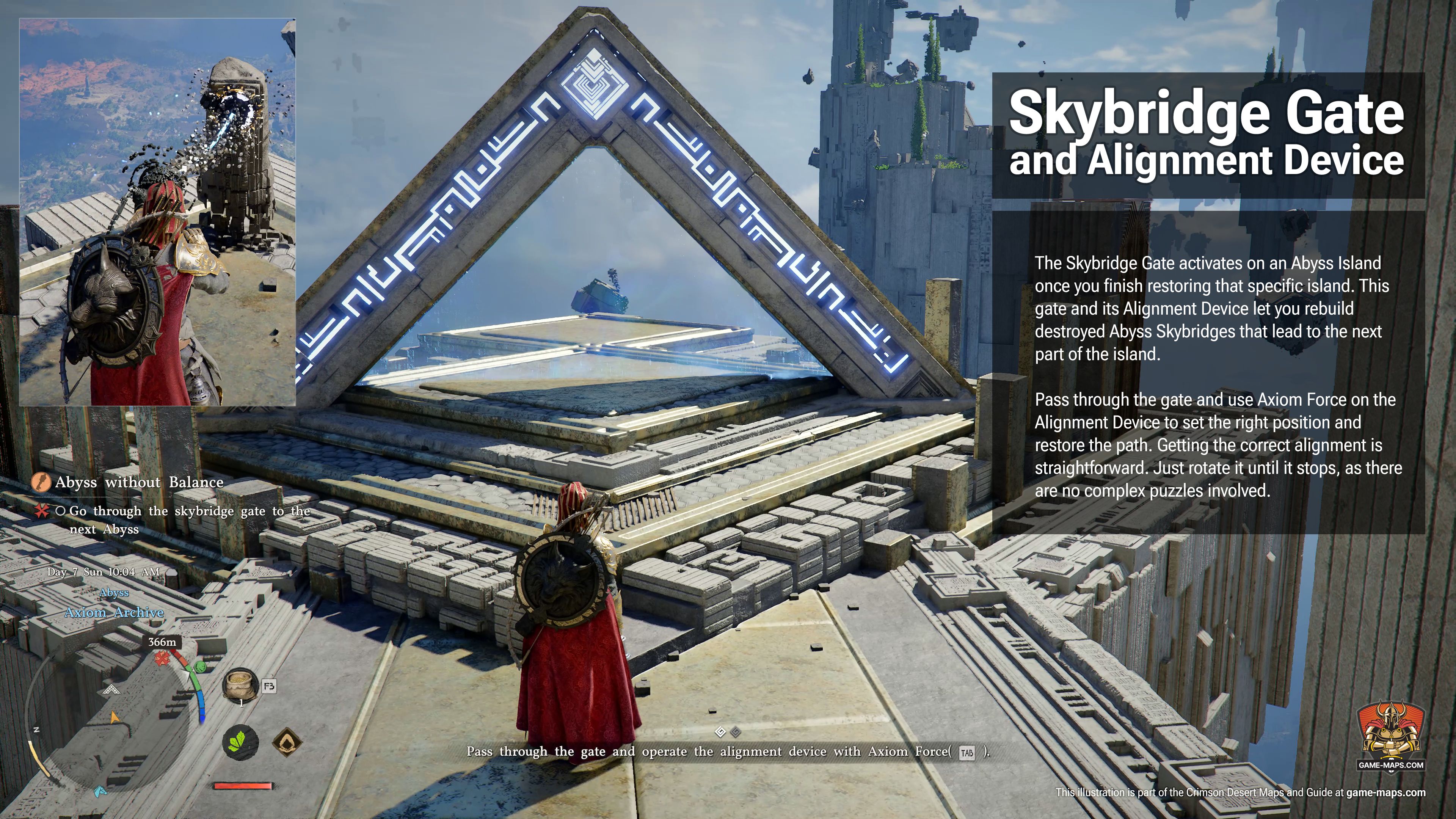
Skybridge Gate and Alignment DeviceThe Skybridge Gate activates on an Abyss Island once you finish restoring that specific island. This gate and its Alignment Device let you rebuild destroyed Abyss Skybridges that lead to the next part of the island. Pass through the gate and use Axiom Force on the Alignment Device to set the right position and restore the path. Getting the correct alignment is straightforward. Just rotate it until it stops, as there are no complex puzzles involved. |
Artifacts |
|
|
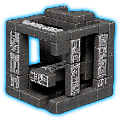
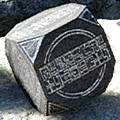
Abyss ArtifactAbyss Artifacts work as a currency you can trade in for Skill Points to build out your character or boost your Health, Stamina or Spirit. You'll pick up Abyss Artifacts as you fill your XP bar, but they're also handed out for taking down bosses, finishing Main Quests, and solving puzzles at Abyss Cressets. |
|
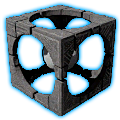
Sealed Abyss ArtifactSealed Abyss Artifacts are physical items scattered throughout Pywel. Grabbing one triggers a specific Challenge. Once that's finished, you can "unseal" the item right in your inventory to get an Abyss Artifact, a Faded Abyss Artifact, or some Abyss Gear. Look for Sealed Abyss Artifacts along roads, usually tucked away in small stone altars or cairns. |
|
Faded Abyss ArtifactFaded Abyss Artifacts work just like Respec Tokens. Using one lets you reset your entire Skill Tree to get back all your regular Abyss Artifacts. They’re pretty rare and tough to find, but later in the story, you can pick them up from Witch Vendors or just craft them yourself. |
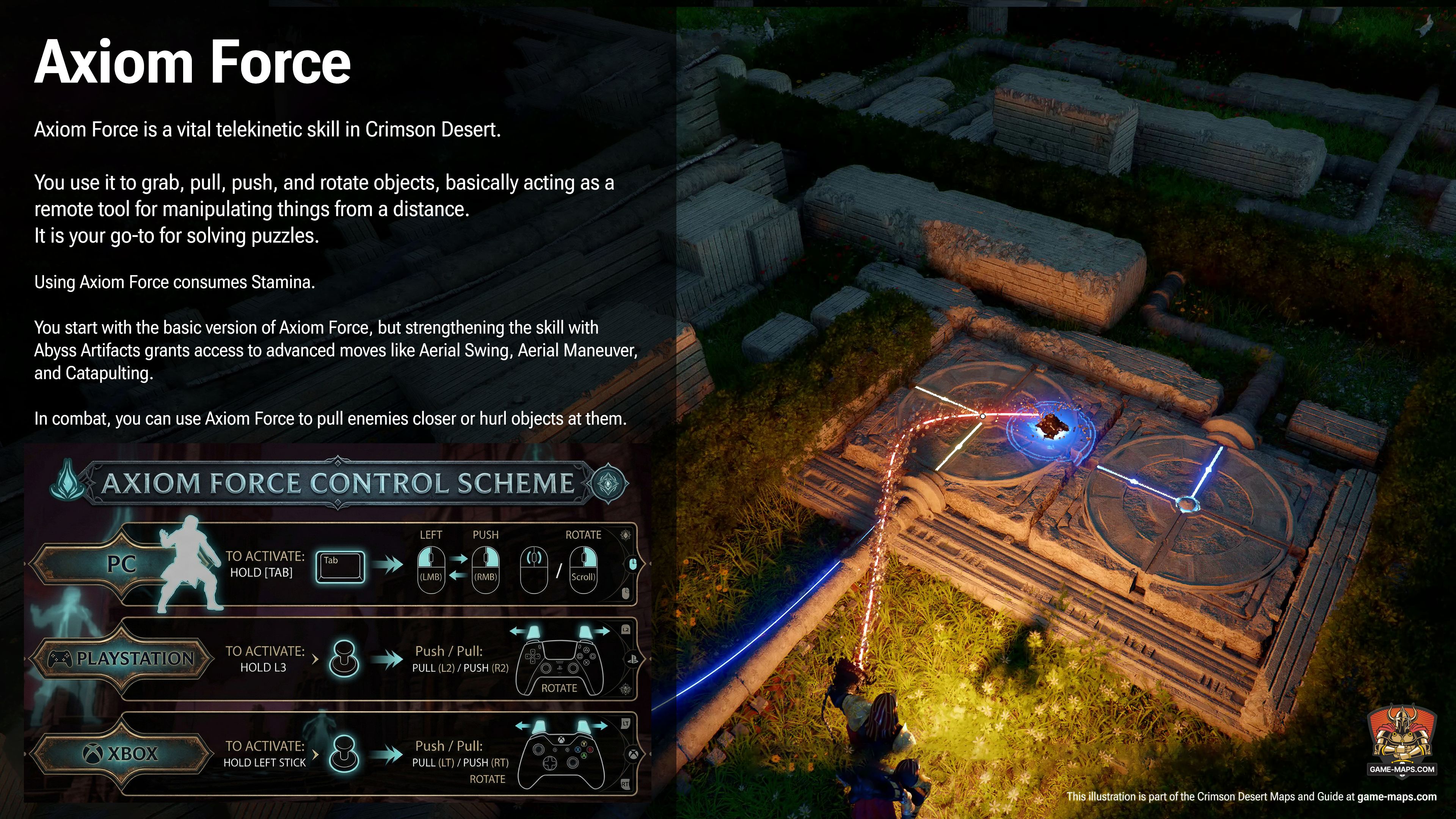
Axiom ForceAxiom Force is a vital telekinetic skill in Crimson Desert. You use it to grab, pull, push, and rotate objects, basically acting as a remote tool for manipulating things from a distance. It is your go-to for solving puzzles. Using Axiom Force consumes Stamina. You start with the basic version of Axiom Force, but strengthening the skill with Abyss Artifacts grants access to advanced moves like Aerial Swing, Aerial Maneuver, and Catapulting. In combat, you can use Axiom Force to pull enemies closer or hurl objects at them. | |
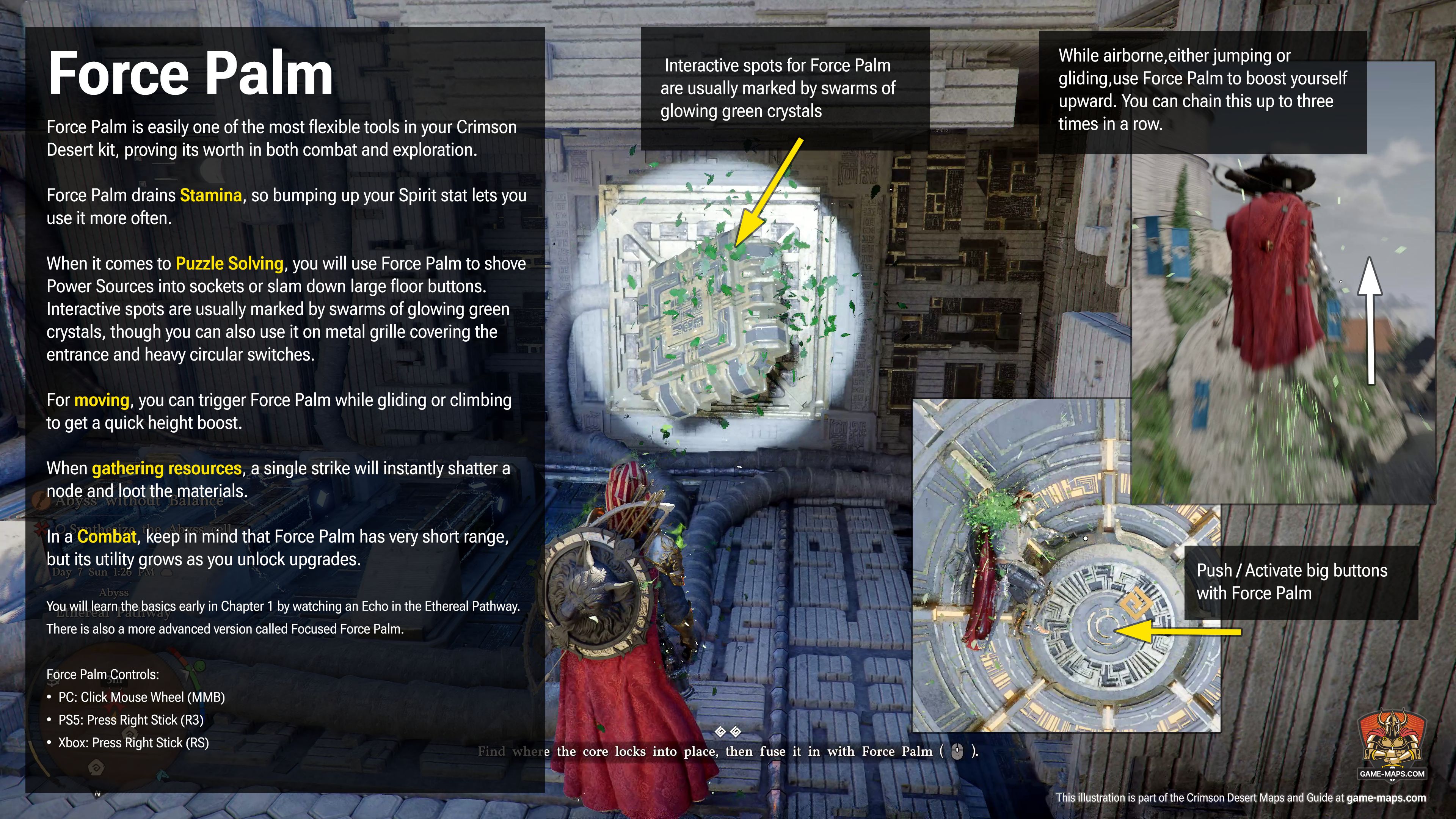
Force PalmForce Palm is easily one of the most flexible tools in your Crimson Desert kit, proving its worth in both combat and exploration. Force Palm drains Stamina, so bumping up your Spirit stat lets you use it more often. When it comes to Puzzle Solving, you will use Force Palm to shove Power Sources into sockets or slam down large floor buttons. Interactive spots are usually marked by swarms of glowing green crystals, though you can also use it on metal grille covering the entrance and heavy circular switches. For moving, you can trigger Force Palm while gliding or climbing to get a quick height boost. When gathering resources, a single strike will instantly shatter a node and loot the materials. In a fight, keep in mind that Force Palm has very short range, but its utility grows as you unlock upgrades. You will learn the basics early in Chapter 1 by watching an Echo in the Ethereal Pathway. There is also a more advanced version called Focused Force Palm. Force Palm Controls:
| |
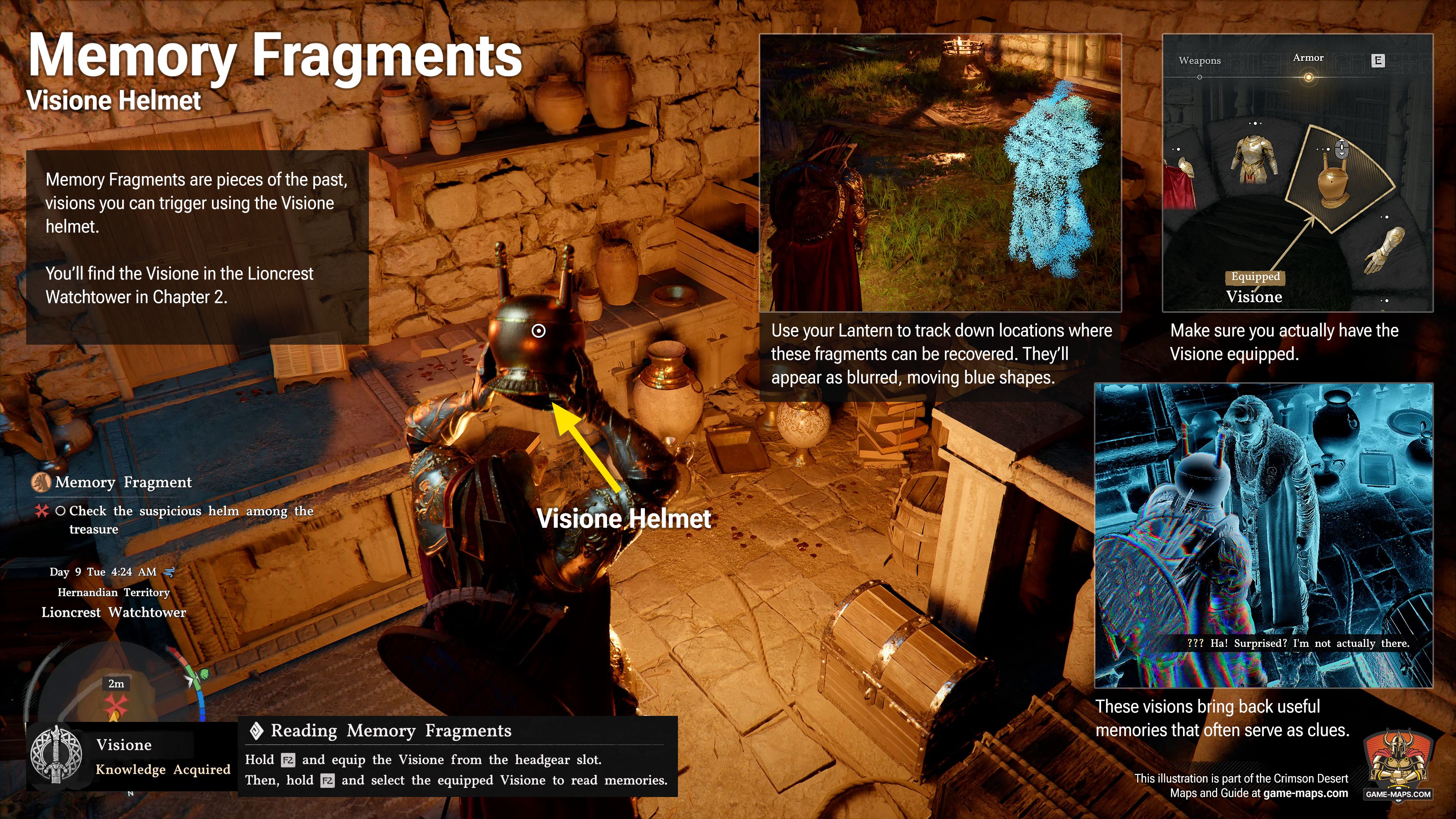
Memory Fragments and Visione helmetMemory Fragments are pieces of the past, visions you can trigger using the Visione helmet. You’ll find the Visione in the Lioncrest Watchtower in Chapter 2. Use your Lantern to track down locations where these fragments can be recovered. They’ll appear as blurred, moving blue shapes. Make sure you actually have the Visione equipped. These visions bring back useful memories that often serve as clues. |
|
Minigames |
|
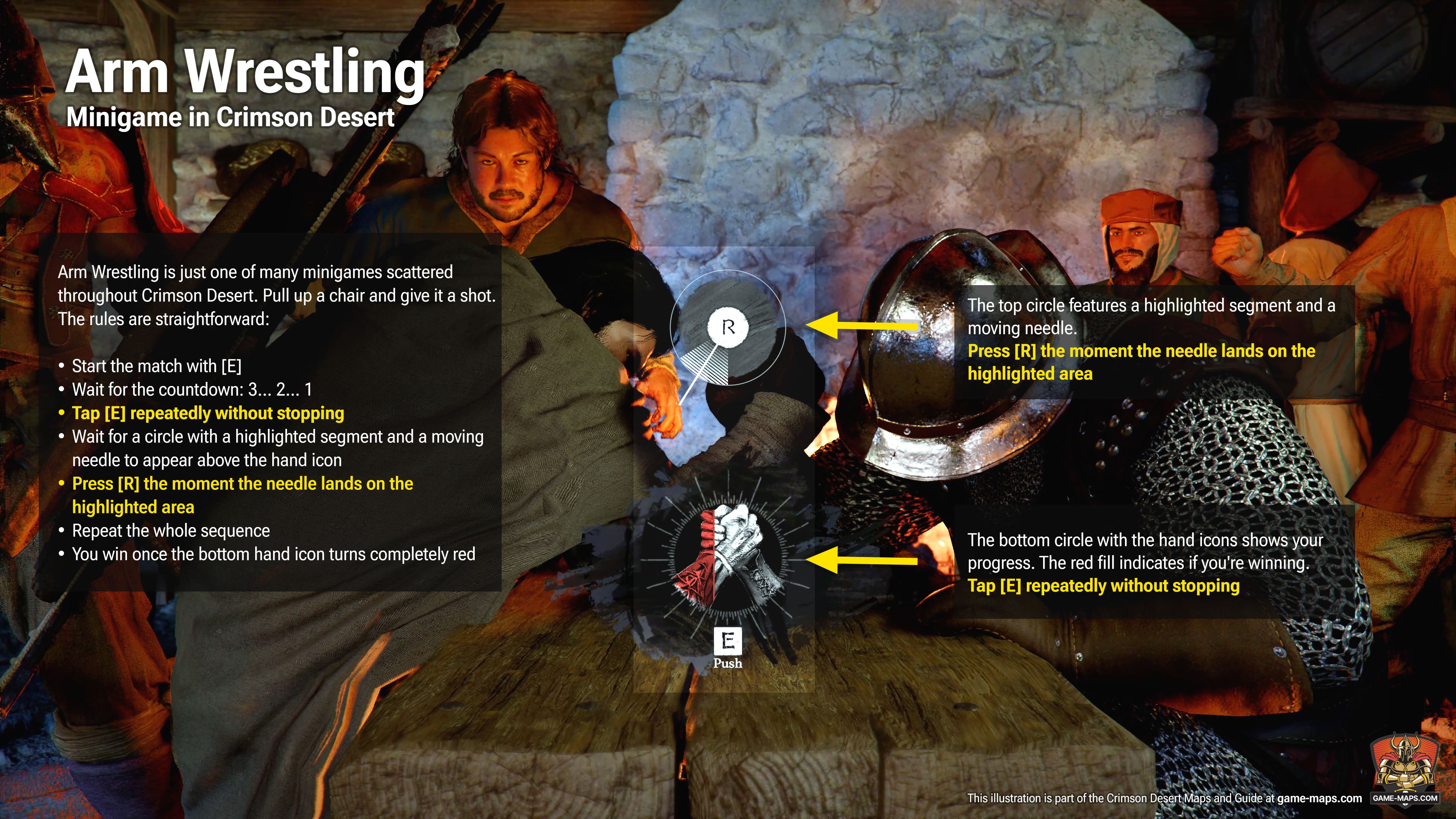
Arm Wrestling MinigameArm Wrestling is just one of many minigames scattered throughout Crimson Desert. Pull up a chair and give it a shot.
| |
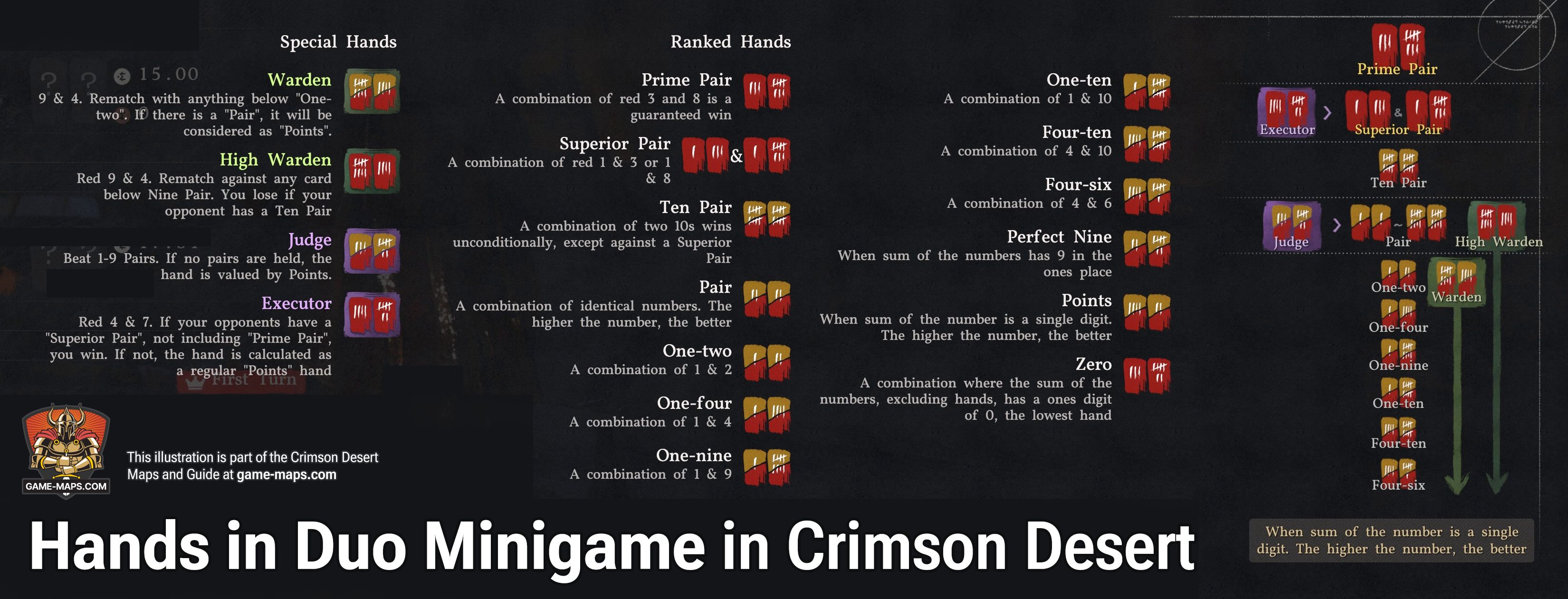
Duo Minigame GuideDuo is a game where players compete for the pot based on the combinations of their hands. At the start of the game, each player is dealt 2 cards. After checking your hand, you can either place a bet or fold; the player with the highest-ranking hand wins. Predict your opponent's hand and raise the bet at the right time to claim your victory! Play Duo with 20 cards numbered 1 to 10. Combine 2 cards to form a high-ranked set and win the round. Each number has a Yellow and Red card; Red cards are key to forming powerful sets or creating tactical variables. Read your opponent's mind and strike their weaknesses with strategy. Pay the base ante while seated to start Duo. Receive 2 cards to choose an action after checking your cards:
Call is automatic if the 10 second time limit is exceeded. The cards are revealed when the pot can no longer be raised or when all players match the current bet. You can't keep playing if your silver falls below the base ante. Card Descriptions
Unique Combinations
Tips for Winning
|
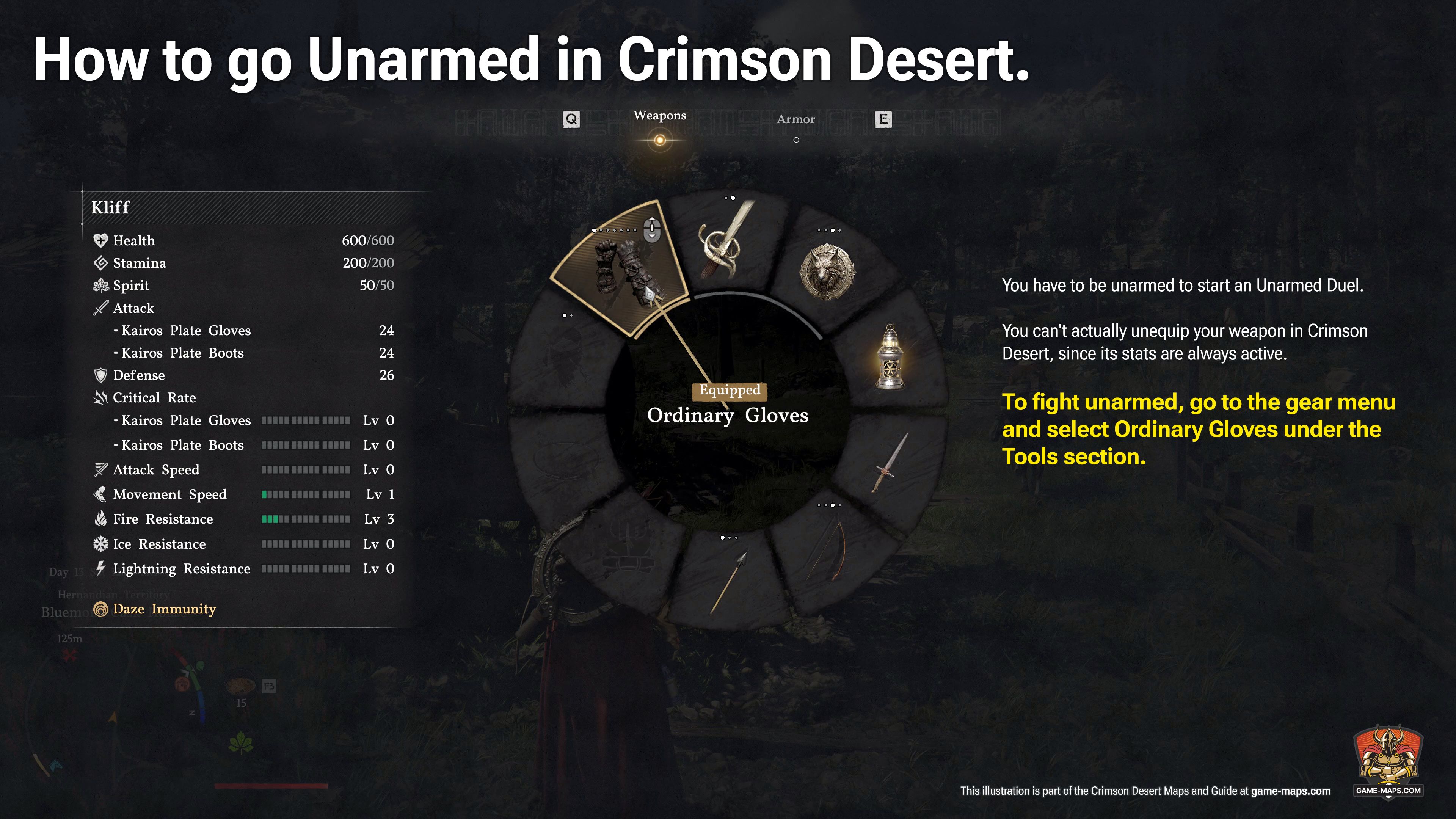
How to go unarmed for Unarmed Duel in Crimson Desert
|
Quick Tips for Crimson Desert: |
|
Leveling |
There are no character levels. Crimson Desert doesn't have traditional leveling, so your character's power depends entirely on passive Skills bought with Abyss Artifact and the quality of your gear. Keep your equipment upgraded to stay competitive. |
Interacting with the world. | Crimson Desert features a wide variety of interactions and actions, but they aren’t always available. To see what you can do, walk up to a person or object and hit the Interaction button (CTRL on PC) to pull up the list of available options. |
Walking, Jog, Run and Sprint | Walking is your default speed when using the analog stick or directional keys. To pick up the pace and Jog, just press the Sprint button once (Shift on PC, X on consoles). If you want to Run, double-tap that same button; it’s a toggle, so you’ll keep moving until you come to a full stop. To hit a full-on Sprint, you need to mash the button repeatedly. Keep in mind that sprinting eats through your stamina bar fast, so use it sparingly. |
Jumping | Naturally, your jump distance depends on your momentum, so the faster you're moving, the further you'll clear. The real game-changer is the Precision Jump, which is a life-saver when you're navigating narrow beams or tight ledges. Before you leap, hit the Interaction button and aim at your landing spot to stick the landing every time. |
Climbing and stamina | Scaling walls and cliffs drains your stamina, so don't try to go too far in one shot. If your bar runs dry before you reach the top, you're going to lose your grip and fall. |
You heal by eating | You heal by eating ehich is essential when you're in the middle of a fight. Make sure to cook your ingredients first over a campfire or in cooking pots. |
Pet every animal | Pet every animal you run into. Once an animal's trust hits 100, it follows you around and picks up loot from fallen enemies. You can only earn up to 25 trust points per animal each day. |
Building Trust | Talking nice with NPCs earns you Trust, and every faction or character type tracks their own standing with you. Make sure to chat up as many people as possible to stay on their good side and keep those trust levels climbing. |
Read documents | Once you’ve looked through flyers, recipes, and letters, you can just sell them off. |
User Comments
All your comments, suggestions and corrections are very welcome. Your experience in the game will help other players. I will read each of your comments and try to add to the content on this page based on them. Thank You.